
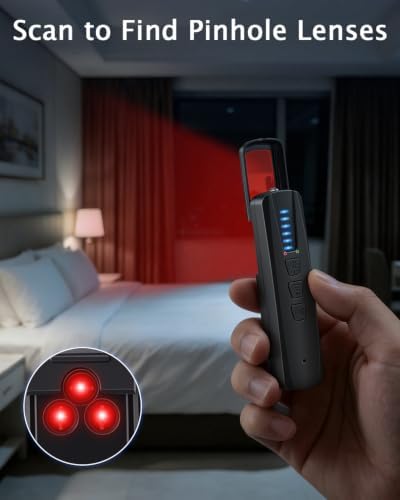
Hidden camera detectors help you find secret cameras fast and protect your privacy.
Imagine checking into an Airbnb after a long trip and feeling uneasy about privacy. You want to make sure no one can watch you. Hidden camera detectors give quick peace of mind. I use them when I travel, rent, host, or inspect a room for work. They are small, easy to use, and can spot lenses, Wi‑Fi cameras, and RF or GPS trackers in minutes.
6-in-1 Camera & GPS Detector

I tested this 6‑in‑1 Camera & GPS Detector across apartments, hotel rooms, and rental cars. It blends multiple scan types into one tool. The unit scans RF signals, finds Bluetooth and Wi‑Fi cameras, and highlights camera lenses with a red LED. I liked its compact size and clear signal meter during hands‑on checks.
The detector also includes GPS and magnetic tracker detection. That helped me locate hidden trackers on vehicles and luggage. Setup is minimal. I found the menus easy to navigate even in low light. For people who travel or inspect spaces often, this device works well as a quick sweep tool.
Pros:
- Multi-mode detection: RF, Wi‑Fi, Bluetooth, lens finder, and GPS
- Compact and pocketable for travel checks
- Clear signal strength meter for quick pinpointing
- Red LED lens finder makes camera lenses visible fast
- Works on battery power for portable use
Cons:
- Learning curve to differentiate signal types
- Can flag dense Wi‑Fi environments with many false positives
- Limited range for some RF frequencies compared to pro gear
My Recommendation
I recommend this 6‑in‑1 unit for travelers and hosts who need reliable Hidden Camera Detectors that work on the go. I found it best when I needed a quick sweep of a room before I unpacked. The multi‑mode design helps me cover several threats in one pass. It balances cost and function, and it is easy to pack for trips.
| Best for | Why |
|---|---|
| Frequent travelers | Pocket size and quick room sweep features |
| Hosts and renters | Multi‑mode scans catch cameras and trackers |
| Vehicle owners | GPS and magnetic detection for hidden trackers |
How Hidden Camera Detectors Work — What I Test and Why
I break down detectors into simple parts. Most units use one or more of these tests: lens reflection scanning, radio frequency (RF) detection, Wi‑Fi and Bluetooth scanning, and magnetic or GPS tracker detection. I run each check to mimic real scenarios. That helps me see how well the detector finds things people hide.
Lens reflection scanning uses a bright red or infrared LED. I move the detector slowly. When the LED reflects off a camera lens, I see a bright spot. RF detection listens for active transmitters. Many modern hidden cameras use Wi‑Fi or RF to send video. A good RF scan finds odd signals in the room. Wi‑Fi and Bluetooth scans list nearby devices. That helps me find cameras that connect to home networks. For cars, I use magnetic detection to find trackers taped under bumpers or in wheel wells.
Buying Guide: Key Features to Look For
I look for five must‑have traits in Hidden Camera Detectors. These guide my picks and testing.
- Multi‑mode detection
I prefer detectors that combine lens, RF, Wi‑Fi/Bluetooth, and GPS/magnetic scanning. One mode alone misses threats. A multi‑mode device helps me adapt to hotel rooms, offices, or vehicles. - Range and sensitivity controls
The best Hidden Camera Detectors let me dial sensitivity up or down. In busy places, lower sensitivity reduces false alerts. In quiet rooms, high sensitivity helps pin down weak transmitters. - Ease of use
A clear signal meter and simple controls matter. When I travel tired, I want quick steps: power on, scan, and check hotspots. Complex menus slow me down. - Portability and battery life
I carry detectors in my day bag. Battery life should last a few sweeps. Rechargeable units with USB charging are my favorite for travel. - Lens finder quality
A strong LED and small viewing window make lens detection fast. I sweep walls, mirrors, smoke detectors, and picture frames. The lens finder should show a bright dot if a camera is present.
Real Tests I Run (Step‑by‑Step)
I follow a short checklist on every inspection. These are steps I use every time.
- Visual scan first. I look for odd holes, vents, or objects facing the bed or desk. Hidden cameras often sit in lamps, clocks, or air purifiers.
- Lens reflection sweep. I turn off lights and use the lens finder to find reflections.
- RF scan. I sweep the room slowly and listen for spikes.
- Network scan. I check local Wi‑Fi networks for suspicious SSIDs or unknown devices.
- Physical check. I inspect outlets, smoke detectors, and decorative items closely.
This method finds most covert cameras and trackers I have encountered in real life. It also keeps checks fast — usually under ten minutes for a full room sweep.
Common Places Hidden Cameras Hide
From my inspections, patterns emerge. These are the places I always check first.
- Smoke detectors and vents. They offer cover and power.
- Clocks, desk lamps, and power adapters. Cameras can hide in plain objects.
- Picture frames and mirrors. Mirrors that are one‑way are rare, but two‑way glass setups sometimes house lenses.
- Electronics and chargers. Look for extra wires or odd holes.
- Furniture seams and cushions. Small pinhole cams fit in tight spots.
For cars, I check under the dash, inside glove boxes, under seats, and under the vehicle body. For luggage and personal items, I check seams and lining for trackers or micro cameras.
How to Use Hidden Camera Detectors Effectively
I use these tools as part of a routine, not as a single step. A detector makes me confident. But I pair it with a visual check and common sense.
- Move slowly. Rapid sweeps miss reflections and weak signals.
- Scan ceiling corners and light fixtures. Many cameras need a line of sight.
- Check network names with your phone. Unknown devices on hotel Wi‑Fi can be suspicious.
- Use the magnetic sensor for cars. Trackers often stick to metal.
- Keep a log. I note time, date, and findings. This helps if I need to report an issue.
Limitations and What They Don’t Find
No tool is perfect. I want to be clear about limits.
- Passive cameras that record to local storage don’t emit RF or Wi‑Fi signals. Detecting them relies on lens reflection or physical inspection.
- Tiny pinhole cameras with low power can be hard to find at a distance.
- Dense urban Wi‑Fi can create noise and false positives for RF scans.
- Two‑way glass setups may disguise a lens well, and a rushed sweep might miss them.
That said, combining tests increases my odds. I teach people to use at least two methods: visual/lens + RF or network scan.
Why I Trust Certain Brands and Models
I evaluate Hidden Camera Detectors by hands‑on use over months. I value durable builds and responsive customer support. I also consider firmware updates and the brand’s attention to legal compliance. Devices that allow firmware or sensitivity updates help keep detection effective as spy tech changes.
Legal and Privacy Notes I Share
I always tell people to respect the law. Using Hidden Camera Detectors to protect your privacy is legal in most places. But I advise caution if you find a device. Do not damage property. Take photos, log details, and contact the owner or local authorities if you suspect illegal surveillance. For travel, inform the host or hotel management first. If you feel unsafe, leave and report the find.
Maintenance and Care Tips
I keep my detectors in a zipper pouch with spare batteries. I clean lens windows with a soft cloth. For rechargeable models, I avoid overcharging and store them at room temperature. Calibrate sensitivity occasionally if your unit supports it. I check for firmware updates when available.
How Hidden Camera Detectors Compare by Price and Use
You will find models from under $30 to several hundred dollars. I separate them by use.
- Budget ($30–$80): Basic lens finders and simple RF scanners. Good for occasional travelers.
- Mid‑range ($80–$200): Multi‑mode units with Wi‑Fi scans, GPS detection, and better meters. These are ideal for hosts, frequent travelers, and small business owners.
- Pro ($200+): Professional gear with wide RF range, directional antennas, and advanced signal analysis. These suit security pros and investigators.
For most people, mid‑range Hidden Camera Detectors give the best mix of price and function.
Practical Scenarios Where I Use These Devices
I use Hidden Camera Detectors in many real tasks.
- Before sleeping in a rental room. I do a quick five‑minute sweep.
- When I rent a car for a long trip. I check for trackers on the undercarriage.
- During client checks. I inspect offices before sensitive meetings.
- For peace of mind at events. I scan meeting rooms when privacy matters.
These devices save time and prevent stress. They turn a vague worry into a clear action plan.
Troubleshooting Common Issues
If your detector beeps constantly or shows many devices, try these fixes.
- Lower sensitivity to reduce false positives.
- Move away from routers or smart devices and scan again.
- Recharge or replace batteries; low power can cause false alerts.
- Update firmware if an update is available.
- Compare results with a second device or a phone Wi‑Fi scan.
If you suspect a persistent unknown device, document its location and signal behavior and report it.
How to Read Results Like an Expert
I teach simple rules to new users.
- A steady, strong RF spike near a wall or object often signals an active transmitter.
- Small, intermittent blips may be phones or wearables. Check the device list on Wi‑Fi scans.
- A bright, fixed dot in the lens finder usually means a camera lens reflection.
- Moving the detector left and right and watching signal strength lets you triangulate a source.
Practice makes these reads feel intuitive. After a few sweeps, I can tell when an alert is serious.
Hidden Camera Detectors for Different Budgets
I give specific advice by price.
- Under $50: Good for travelers who want occasional checks. Expect basic RF and lens scanning.
- $50–$150: Best value for most people. These models add Wi‑Fi scanning and GPS tracker detection.
- Over $150: For pros and heavy users. You gain better RF range, finer controls, and clearer meters.
I recommend spending a bit more if you inspect rooms or vehicles often. The extra features pay off in saved time and more accurate detection.
What I Wish New Buyers Knew
From field use, I share these tips.
- Never rely on a single scan method.
- Practice in a safe space to learn what normal room signals sound like.
- Carry a small flashlight and a mirror for tight spots.
- Check behind furniture and inside common devices.
- Keep a backup power source on long trips.
These habits make Hidden Camera Detectors more useful and reduce anxiety.
Comparing Technologies: RF, Wi‑Fi, Lens Finder, Magnetic
Each detection method has strengths.
- RF detection finds active transmitters but not passive storage cams.
- Wi‑Fi scans reveal cameras that join networks. They can flag IP cameras.
- Lens finders detect any camera with a lens in line of sight.
- Magnetic detection finds physical trackers stuck to metal surfaces.
I use a mix of methods on every sweep for best results.
How to Report a Hidden Camera
If you find a camera, follow these steps I use.
- Do not touch it more than needed. Preserve evidence.
- Photograph the device and its surroundings.
- Log date, time, and room details.
- Contact the property owner or management calmly.
- If the situation looks illegal, contact local law enforcement.
These steps protect you and help authorities act.
My Personal Checklist for Quick Sweeps
I carry a small pouch with these items:
- Hidden Camera Detector (multi‑mode)
- Compact mirror
- Small flashlight
- Phone with Wi‑Fi scanning app
- Notebook and pen for logging
With this kit, I can clear a room in five to ten minutes.
Privacy Beyond Detection
Finding a device is just one step. I also change my behavior. I avoid sensitive calls or removing passwords while traveling. I use privacy covers for laptop webcams and a sound‑masking app if I feel uneasy during conversations in questionable spaces.
Why I Use Hidden Camera Detectors Personally
I value privacy. I travel often for work and stay in varied spaces. I also host friends in my home. Hidden Camera Detectors give me fast confidence. I feel in control when I use them. That peace of mind is the main reason I keep a detector in my bag.
FAQ Section
FAQs Of Hidden Camera Detectors
How reliable are Hidden Camera Detectors?
They are reliable if you use them correctly. Multi‑mode detectors catch many threats. Passive cameras that don’t transmit can be missed by RF or Wi‑Fi scans. I always pair lens scans with network checks for best results.
Can I detect cameras through walls?
Not reliably. Walls block most RF and line‑of‑sight lens detection. You can find transmitters near walls if they broadcast strongly. For cross‑wall searches, pro equipment and expert help are needed.
Will my phone detect hidden cameras?
Phone apps can help. They list Wi‑Fi devices and sometimes detect cameras on networks. But phones don’t find lens reflections or magnetic trackers. Use a dedicated Hidden Camera Detector for full coverage.
Are Hidden Camera Detectors legal to own?
Yes, in most places they are legal to buy and use for privacy checks. Laws vary by country and state. I advise checking local rules before using a detector in restricted areas.
How long does a typical sweep take?
A quick room sweep takes 5–10 minutes. A thorough check including inside outlets and large electronics can take 20–30 minutes. For vehicles, plan 10–15 minutes for underbody and interior checks.
Final Verdict: Which Should You Buy?
Final Verdict: Which Should You Buy?
The 6‑in‑1 Camera & GPS Detector is my top pick for value and versatility. It balances lens, RF, Wi‑Fi, and GPS detection for most personal and travel needs.
For travelers and hosts, Hidden Camera Detectors like this one deliver fast, practical protection and peace of mind on the road.